
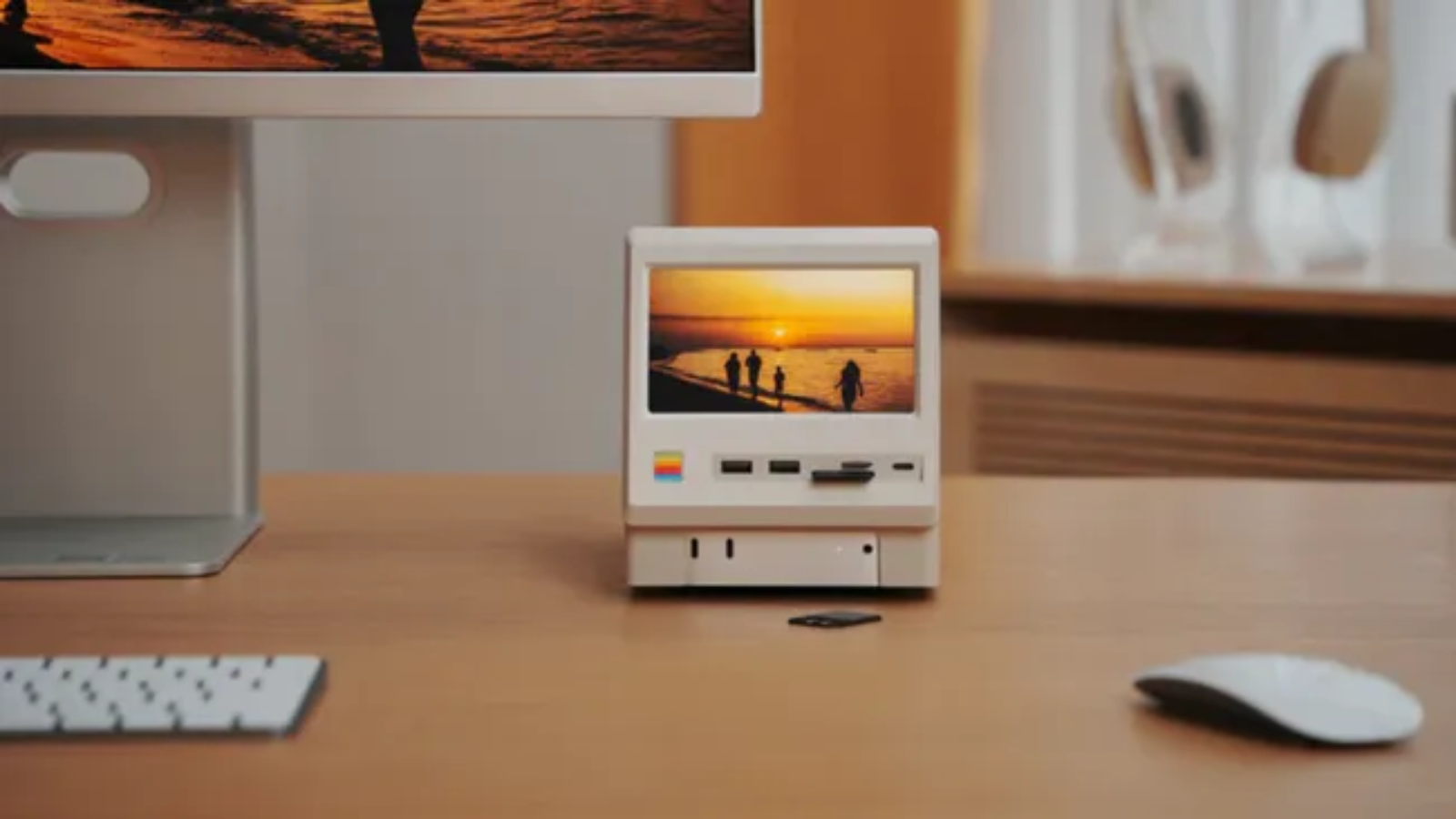
Apple enthusiasts have always appreciated products that combine nostalgia with innovation, and a newly released retro-inspired docking station for the Apple Mac Mini M4 is doing exactly that.
Designed to resemble the iconic Macintosh computers from the 1980s, this unique accessory transforms Apple’s compact desktop into a miniature vintage Mac while adding practical upgrades like a built-in LCD display, additional ports, and expandable SSD storage. The dock has quickly gained attention across the tech community thanks to its blend of classic aesthetics and modern productivity features.
A Classic Macintosh Design Reimagined
At first glance, the dock looks like a tiny original Macintosh computer complete with a miniature display. The Apple Mac Mini M4 slides neatly into the dock, creating the appearance of a compact all-in-one desktop without requiring any modifications to the computer itself.
Rather than being just a decorative accessory, the retro enclosure is designed to serve as a fully functional desktop hub, making it attractive for creators, developers, and Apple enthusiasts alike.
Built-In 5-Inch LCD Display
One of the standout features is the integrated 5-inch HD LCD display with a 1280×720 resolution.
Although it’s not intended to replace a primary monitor, the display can be used for:
- System monitoring
- CPU and GPU statistics
- Digital clock
- Music playback controls
- Calendar widgets
- Notifications
- Weather information
- Video playback
- Digital photo frame
For professionals who prefer having live system information visible without occupying their main monitor, this small screen offers a practical solution.
More Than Just a Retro Accessory
The dock functions as a complete USB-C docking station, significantly expanding the connectivity of the Mac Mini.
Depending on the model, users can expect:
- Multiple USB-A ports
- USB-C expansion ports
- SD Card reader
- microSD Card slot
- 3.5mm headphone jack
- HDMI or DisplayPort output
- M.2 NVMe SSD slot
- USB-C host connection
These additions help eliminate cable clutter while making frequently used ports much easier to access.
Expand Storage Without Paying Apple’s Premium
Storage upgrades for Apple devices have long been expensive.
This retro dock addresses that issue by including an M.2 NVMe SSD enclosure capable of supporting drives up to 8TB, allowing users to add high-speed external storage without opening the Mac Mini.
This makes the accessory particularly attractive for:
- Video editors
- Photographers
- Developers
- AI enthusiasts
- Content creators
who frequently work with large files.
Two Versions Available
The manufacturer offers two configurations.
Standard Version
- USB 3.2 (10Gbps)
- HDMI output
- Multiple USB ports
- SD & microSD support
- Integrated SSD enclosure
Premium Thunderbolt 5 Version
- Thunderbolt 5 connectivity
- Up to 80Gbps bandwidth
- DisplayPort output
- Faster SSD performance
- Additional USB-C connectivity
The premium model is aimed at professionals handling demanding workflows such as 8K video editing or large AI datasets.
Why It’s Becoming Popular
Retro-inspired technology has seen a resurgence in recent years, and this dock taps into that trend by combining nostalgic industrial design with practical functionality.
Instead of simply recreating the appearance of classic Apple hardware, it offers genuine productivity improvements, including:
- Cleaner desk setup
- More connectivity
- Expandable storage
- Secondary display
- Space-saving design
For Mac Mini owners, it provides an easy way to enhance their workstation without modifying the computer itself.
Compatibility
While the enclosure is specifically designed to fit the Apple Mac Mini M4, the dock’s USB-C functionality also allows it to work with other compatible devices that support DisplayPort over USB-C, including:
- MacBook models
- Windows PCs
- Android devices
- Raspberry Pi systems
However, only the Mac Mini M4 benefits from the integrated slide-in retro design.
Who Should Consider Buying It?
This accessory is best suited for users who:
- Love retro Apple aesthetics
- Need additional USB ports
- Want expandable SSD storage
- Prefer cleaner desk organization
- Use the Mac Mini for creative work
- Need a secondary information display
It may be less appealing to users who simply require basic USB expansion, as traditional USB hubs are generally more affordable.
Final Thoughts
The retro Macintosh-inspired docking station proves that desktop accessories can be both functional and visually distinctive. By combining a nostalgic design with a practical feature set—including a built-in LCD display, storage expansion, and extensive connectivity—it offers Mac Mini M4 users a compelling upgrade that stands out from conventional docking stations.
As demand for compact desktop setups continues to grow, accessories like this demonstrate how thoughtful industrial design can enhance both productivity and workspace aesthetics. For Apple fans who appreciate a touch of nostalgia, this retro dock delivers a unique way to modernize their setup while paying homage to one of computing’s most iconic designs.
FAQs
What is the retro Macintosh dock for the Mac Mini M4?
It is a third-party docking station that gives the Apple Mac Mini M4 the appearance of a classic Macintosh while adding extra ports, a built-in LCD display, and expandable SSD storage.
Does the LCD screen work as a second monitor?
Yes. The integrated 5-inch HD display can function as a secondary screen for widgets, system monitoring, notifications, and other lightweight tasks.
Can I upgrade the storage?
Yes. The dock includes an M.2 NVMe SSD slot supporting up to 8TB of external storage, depending on the SSD installed.
Is it compatible with older Mac Mini models?
The retro enclosure is specifically designed for the Mac Mini M4. While the docking functionality can work with other USB-C devices, the slide-in design is intended for the M4 model.
Is it worth buying?
If you value a retro aesthetic, need additional ports, want affordable storage expansion, and like having a compact secondary display, it offers a unique blend of style and functionality.